
FastPixel vs Server-Level Caching (NGINX, Varnish): What’s Better?


You can have perfect server-level caching, and still fail Core Web Vitals.
That sounds like it shouldn’t be true, but we see it constantly. A site with sub-50ms TTFB, Varnish humming along, NGINX config dialed in, and a PageSpeed score sitting at 52.
The server is doing exactly what it’s supposed to. The page reaches the browser almost instantly. But then the browser has to actually render the thing, and that’s where everything falls apart: a 2MB hero image, four render-blocking scripts, three external font requests, and CSS that won’t let the page paint until every last stylesheet has loaded.
Google doesn’t grade you on server response time. LCP, CLS, INP, these metrics track what the visitor sees and feels in the browser. Not what happens on the server.
It’s the difference between a fast waiter and good food. Your waiter can sprint your plate to the table in 10 seconds flat, but if the steak is raw, nobody’s leaving a five-star review. Core Web Vitals grade the food, not the waiter.
So let’s talk about what server-level caching actually handles, where its job ends, and what FastPixel does with the rest.
What is server-level caching?
Every time someone loads a page on your WordPress site, the server normally runs PHP, queries the database, assembles the HTML, and sends it back. That whole process happens from scratch for every single visitor.
Server-level caching stores the finished HTML after the first request. Next visitor gets the cached copy. No PHP, no database, the page is already built and ready to go.
NGINX FastCGI cache and Varnish are the two big names here.
How NGINX FastCGI cache works
NGINX has a caching module built right in. It sits between NGINX and PHP-FPM, and after the first request generates a page, the module stores that HTML output.
Every request after that? NGINX serves the stored copy. PHP never runs. The database never gets touched.
Your TTFB drops significantly, CPU usage goes down, and the same hardware suddenly handles a lot more traffic. It’s a big win for server performance.
But getting there means editing NGINX config files by hand, defining cache zones, setting up cache keys, writing rules to bypass caching for logged-in users, WooCommerce carts, admin pages. You need SSH access and enough NGINX knowledge to not break things.
How Varnish works
Varnish does something different. Instead of caching inside the web server, it sits in front of it as a reverse proxy. Requests hit Varnish before they ever reach NGINX or Apache.
If Varnish has the page in memory, that’s it. The response goes straight back to the visitor. Your web server never even knows someone was there.
Everything stays in RAM, which makes it very fast. Varnish also has its own configuration language, VCL, which gives you fine-grained control over caching behavior. The downside is that VCL has a real learning curve, and Varnish doesn’t handle HTTPS on its own. You end up needing NGINX in front of Varnish just to terminate TLS, so now you’re managing two systems instead of one.
Plenty of managed WordPress hosts run Varnish behind the scenes. But even then, WooCommerce cookies, logged-in user sessions, and dynamic content need careful exclusion rules.
What server-level caching does well
No complaints here. For what it’s built to do, server-level caching is genuinely excellent.
Serving a pre-built HTML page from RAM is orders of magnitude faster than running PHP and querying MySQL on every page load. A properly cached WordPress site can handle thousands of concurrent visitors on a $20/month server. During traffic spikes, the cache absorbs the load and keeps PHP and MySQL from getting overwhelmed, Varnish can even serve stale pages if the backend crashes entirely.
And unlike plugin-based caching, neither NGINX nor Varnish loads WordPress at all for cached requests. No PHP bootstrap, no plugin initialization. The request never touches your application layer.
If your main problem is server response time, this is the right solution.
What sits outside the scope of server-level caching
This is the part that trips people up.
Server-level caching does one thing really well: it makes the HTML reach the browser faster. That’s the job. It was never meant to do anything about what’s inside that HTML or how the browser handles it once it arrives.
Front-end performance is a completely separate layer. It’s not a failing of NGINX or Varnish that they don’t optimize images or defer JavaScript, that was never their purpose.
But it does mean there’s a big chunk of performance work that server caching leaves completely untouched.
Your images, for starters. That hero image is still whatever size WordPress generated. No compression, no format conversion, no responsive sizing. A visitor on a phone gets the same 2MB file as someone on a desktop monitor. Your LCP stays slow no matter how fast the HTML showed up.
Then there’s CSS. Without critical CSS extraction, the browser downloads every stylesheet before it paints a single pixel. The HTML might arrive in 50ms, but the visitor stares at a white screen until all the CSS is ready. That’s your FCP and LCP taking the hit.
JavaScript is another story. Render-blocking scripts stay render-blocking. Server caching doesn’t care what’s in the HTML, it just stores it and serves it. Deferring, delaying, minifying? Not its department.
Same with fonts. If your site loads Google Fonts from an external CDN, every page load still triggers DNS lookups, TLS handshakes, and font file downloads. Server caching doesn’t change any of that.
And then there’s the geographic issue. NGINX and Varnish cache on your origin server. If that server is in Frankfurt and your visitor is in Sydney, the cached page still has to cross the planet.
All of this adds up to the Core Web Vitals problem. You can have a 40ms TTFB and still get flagged for poor LCP, high CLS, or slow INP. Because those metrics measure what happens in the browser, not on the server.
The complexity side of things
Beyond what server-level caching can and can’t do, there’s a practical question: who’s actually going to set this up?
This isn’t a “click a button” situation. NGINX FastCGI cache requires defining cache paths, creating cache keys, and writing bypass logic for every type of request that shouldn’t be cached, POST requests, logged-in sessions, WooCommerce cart pages, checkout flows.
And when the config is wrong, the problems are ugly.
The classic one is cache leaks. If your bypass rules don’t properly exclude logged-in users, Varnish might serve one person’s account dashboard to a stranger. With WooCommerce, it can mean showing someone else’s shopping cart. We’re not talking about theoretical risks here, this is one of the most common caching mistakes in WordPress, and it happens more often than people admit.
Stale content is another regular issue. You update a product price or publish a new post, but visitors keep seeing the old version because nobody purged the cache. Proper invalidation usually means adding yet another plugin (NGINX Helper, Proxy Cache Purge) and hoping everything stays in sync.
Varnish on top of that brings VCL configuration, TLS termination through NGINX, and the general overhead of maintaining two systems that need to agree with each other.
For developers and agencies with their own servers, this is all manageable. They deal with it every day. But a site owner who just wants their WordPress blog to load faster? This is way more complexity than most people want to take on.
Where FastPixel comes in
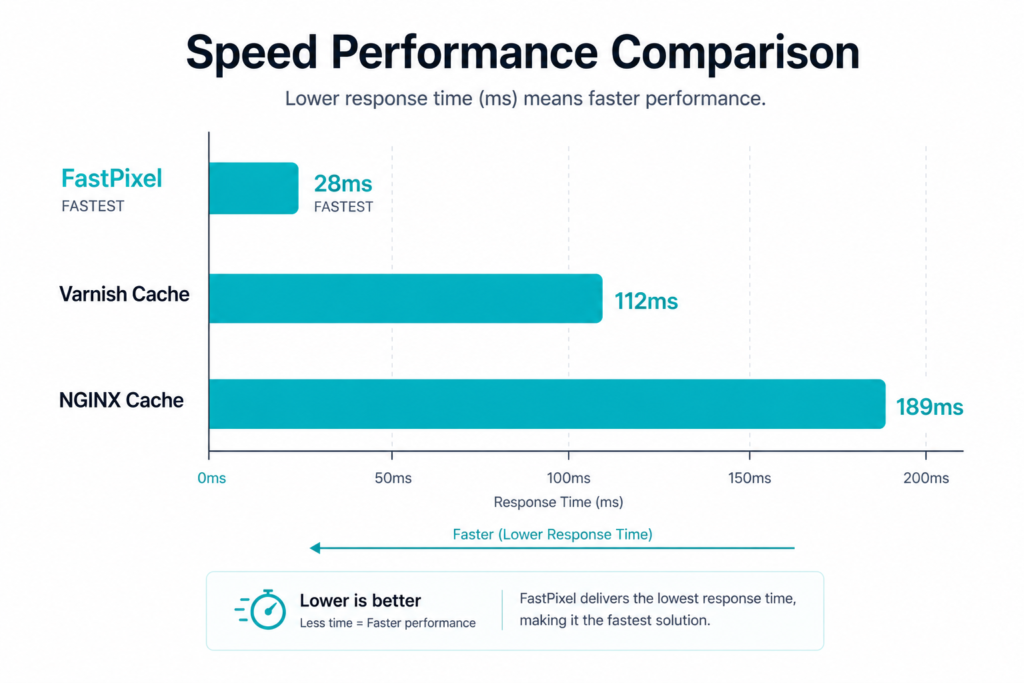
So you’ve got server-level caching handling the backend. What about everything else?
That’s the layer FastPixel was built for.
Instead of only caching HTML, FastPixel goes through the page and optimizes what the browser actually has to work with, making everything a lot faster. Images get compressed and converted to WebP automatically, resized for different screen sizes, and lazy loaded. The CSS gets analyzed and optimized so only the styles needed for above-the-fold content load first, which means the browser can start painting the page right away instead of waiting for every stylesheet.
JavaScript gets optimized, deferred and delayed so it stops blocking the initial render. HTML and CSS get minified. Fonts load asynchronously with DNS prefetching so they don’t hold everything up.
And all of that gets served through a built-in CDN, so static assets come from edge locations worldwide instead of your single origin server.
The setup is about as far from NGINX config files as you can get. You pick a preset, Safe, Balanced, or Fast, and that’s basically it, you get the best speed and Core Web Vitals scores. No SSH, no terminal, no cache purge scripts to maintain.
The processing itself happens in FastPixel’s cloud infrastructure. Your hosting server actually does less work with FastPixel running, not more.
Can you use both?
You don’t have to pick one or the other. They don’t compete, they stack.
Server-level caching handles the server layer. It keeps TTFB low and protects PHP and MySQL from heavy traffic. That’s your backend performance.
FastPixel handles the front-end layer. It optimizes images, CSS, JavaScript, HTML and fonts, and delivers everything through a CDN. That’s your visitor-facing performance.
If your hosting already includes NGINX caching or Varnish, great, keep it. FastPixel adds the front-end optimizations on top. If your hosting doesn’t have server-level caching at all, FastPixel’s own page caching covers that base too.
The bottom line
Server-level caching is a good foundation, and if you have it running, keep it.
But it covers one layer: server response time. Everything your visitors actually experience, how fast images appear, whether the layout jumps around, how quickly the page responds to interaction, that’s front-end optimization, and server caching doesn’t go there.
Server-level caching makes your server fast. FastPixel makes your website faster.
If you already have NGINX or Varnish, FastPixel complements it and makes everything a lot faster. If you don’t, FastPixel handles caching too.
Because at the end of the day, PageSpeed scores reflect what visitors experience, and that’s what Google actually measures.
FAQs
Can I use FastPixel alongside NGINX FastCGI cache or Varnish?
Yes. They work at different layers. Server-level caching speeds up HTML delivery. FastPixel optimizes what’s inside those pages and serves static assets through a CDN.
Do I still need server-level caching if I use FastPixel?
Not necessarily. FastPixel has its own page caching built in, so you’re covered even without NGINX or Varnish on your server. But if server-level caching is already available on your hosting, keeping it enabled gives you both layers working together.
Will server-level caching improve my Core Web Vitals?
It helps with TTFB, which is one of several factors. But LCP, CLS, and INP are driven by how images load, how CSS renders, how scripts execute, and whether the layout stays stable. Those are all front-end concerns that server caching wasn’t designed to address, so in this case FastPixel would help!
I’m on shared hosting. Can I use server-level caching?
Usually not. Most shared hosts don’t expose NGINX or Varnish configuration. Some managed WordPress hosts include server-level caching as part of their stack, but you generally can’t customize it. FastPixel works on any hosting environment, shared included, without needing server-level access.
Is FastPixel a replacement for NGINX or Varnish?
It’s not trying to replace them. It handles the front-end optimization work that server-level caching was never built to do, while also bringing improved speed and the best Core Web Vitals.
Boost Core Web Vitals and performance with FastPixel!
Optimize loading times, enhance user experience, and give your website the performance edge it needs.




 English
  French